 Profile Customizer
How to hide Reels and Stories on Facebook
Updated October 25, 2026
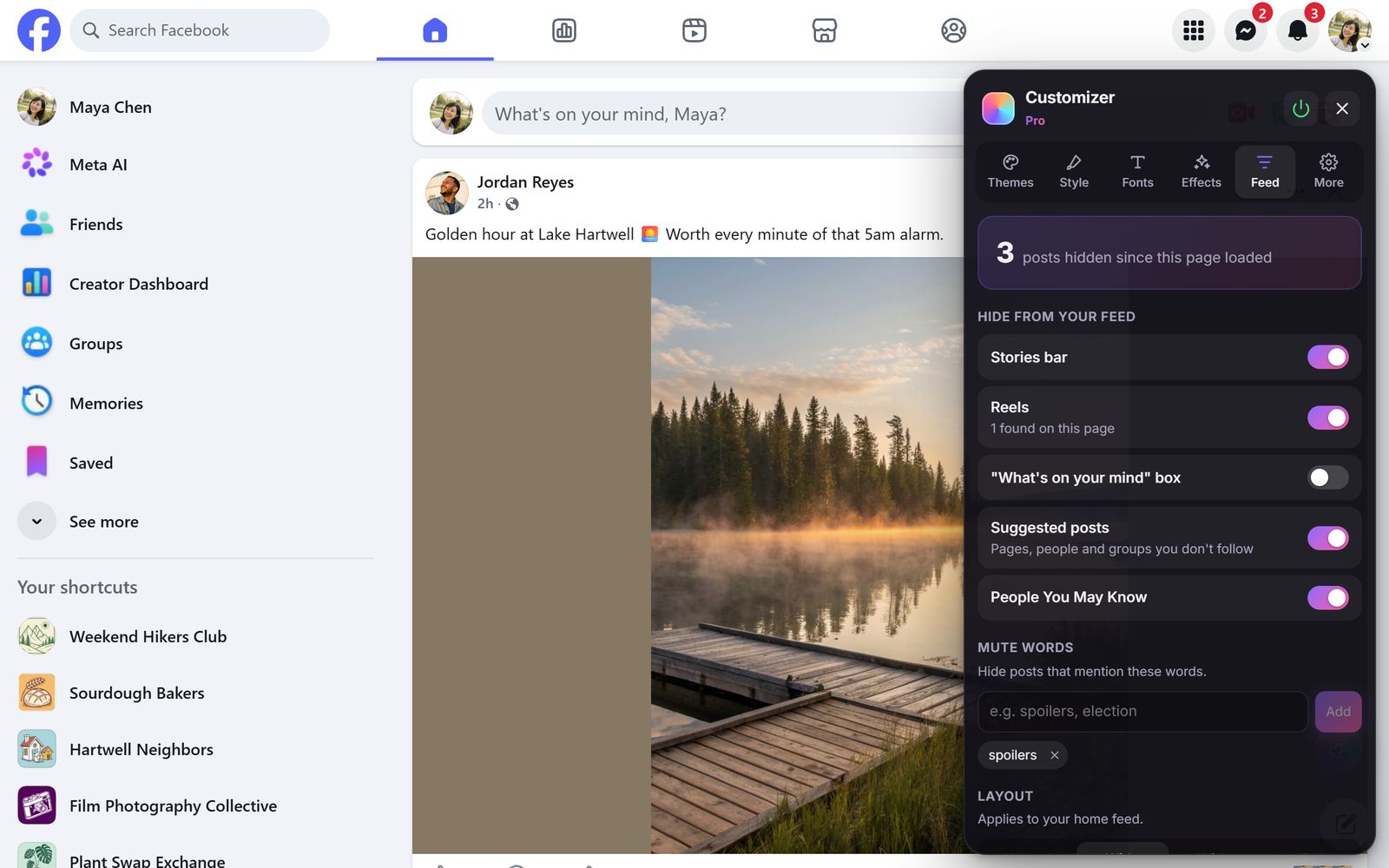
Facebook doesn't have an off switch for Reels. Its options only ask it to show you fewer, and they keep coming back. On a computer, a free extension can remove them from your feed completely.
What Facebook lets you do
- On a Reels and short videos section in your feed, click the ··· menu and choose Hide. Facebook shows fewer of them for a while.
- On a single reel, use its ··· menu to hide it.
- In Settings → Media, turn off autoplay so videos don't start playing as you scroll.
None of these remove Reels for good, and the Stories bar at the top of the feed can't be turned off at all.
Remove them with Profile Customizer (free)
- Add Profile Customizer to Chrome, Edge or Brave.
- Open facebook.com and open the customizer: click the round rainbow button at the bottom right, click the extension icon, or press Alt+Shift+C.
- Go to the Feed tab and, under Hide from your feed, turn on Reels and Stories bar.
They disappear from your feed straight away, and the Feed tab counts how many items it has hidden. You can hide the "What's on your mind" box too. Turn any of them back on whenever you like.
More cleanup with Pro
Pro also hides suggested posts and People You May Know, can mute words you'd rather not see, and can widen the feed.
Questions
Can you turn off Reels on Facebook?
Facebook has no setting to turn them off. On desktop, Profile Customizer's free Feed options remove Reels and the Stories bar from your feed.
Does this work in the Facebook app?
No. Browser extensions only work on facebook.com in a desktop browser such as Chrome, Edge or Brave.
Can I still watch Reels if I want to?
Yes. Hiding them only removes them from your feed. The Reels page still works, and you can switch the option off at any time.