 Profile Customizer
How to change the font on Facebook
Updated October 25, 2026
Facebook doesn't let you change its typeface, and Chrome's own font settings barely touch it because Facebook sets its fonts directly. To change the font everywhere on Facebook, you need an extension that restyles the page.
What your browser can do
- Zoom (Ctrl and +, or ⌘ and + on a Mac) makes everything bigger, including photos and the layout.
- Chrome's Settings → Appearance → Customize fonts changes default fonts, but Facebook overrides them.
Change the font with Profile Customizer
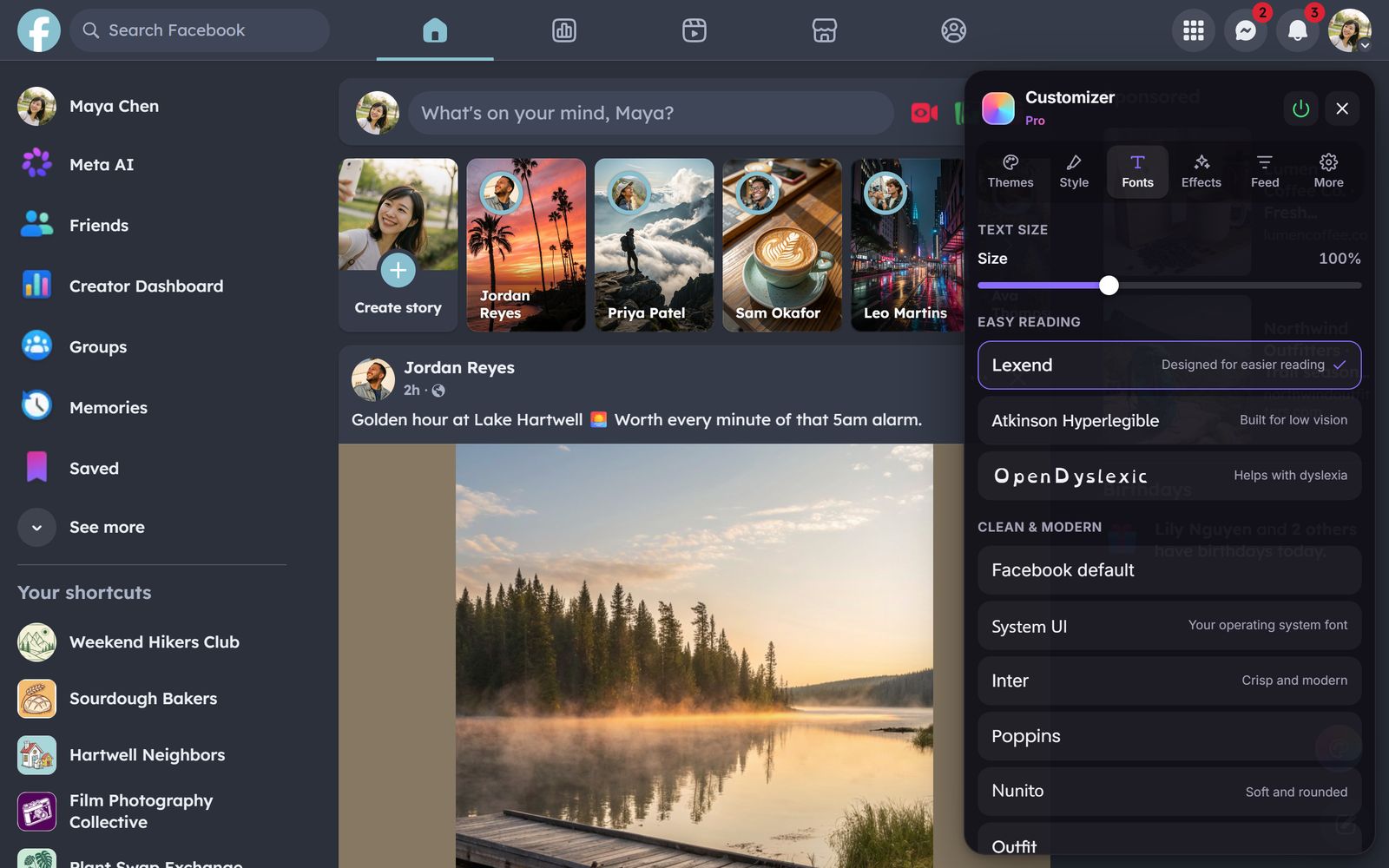
- Open facebook.com and open the customizer: click the round rainbow button at the bottom right, click the extension icon, or press Alt+Shift+C.
- Go to the Fonts tab.
- Hover over a font to preview it on the page, then click to keep it.
Every font is bundled with the extension, so nothing loads from the web and they work offline.
The 20 fonts
- Easier reading (free): Lexend, Atkinson Hyperlegible and OpenDyslexic, designed to make reading easier, including with dyslexia or low vision.
- Clean and modern: Inter (free), Poppins, Outfit, Space Grotesk, Verdana.
- Rounded and friendly: Nunito, Quicksand, Fredoka.
- Serif: Lora, Playfair Display, Georgia.
- Fun: Pixelify Sans (retro pixels), Orbitron (sci-fi), Caveat (handwriting), Comic Neue and Comic Sans.
- Monospace: JetBrains Mono.
Your computer's own system font is available too.
Make text bigger without zooming
The Text size slider at the top of the Fonts tab scales Facebook's text from 85% to 130% without making photos and the layout huge. It's free.
Questions
Can you change the font on Facebook?
Not in Facebook's settings. Profile Customizer replaces the font across all of facebook.com with one of 20 bundled fonts.
Will my friends see my font?
No. Only you see it. It doesn't change how your posts look to anyone else.
How do I post in a different font?
Fancy-text generators swap your letters for look-alike Unicode symbols. Other people see those, but screen readers often can't read them. Profile Customizer changes the font you see, not your posts.
Which font is best for dyslexia?
Many people like Lexend or OpenDyslexic, and Atkinson Hyperlegible was designed for low vision. Preview each one live and keep whichever reads best for you.